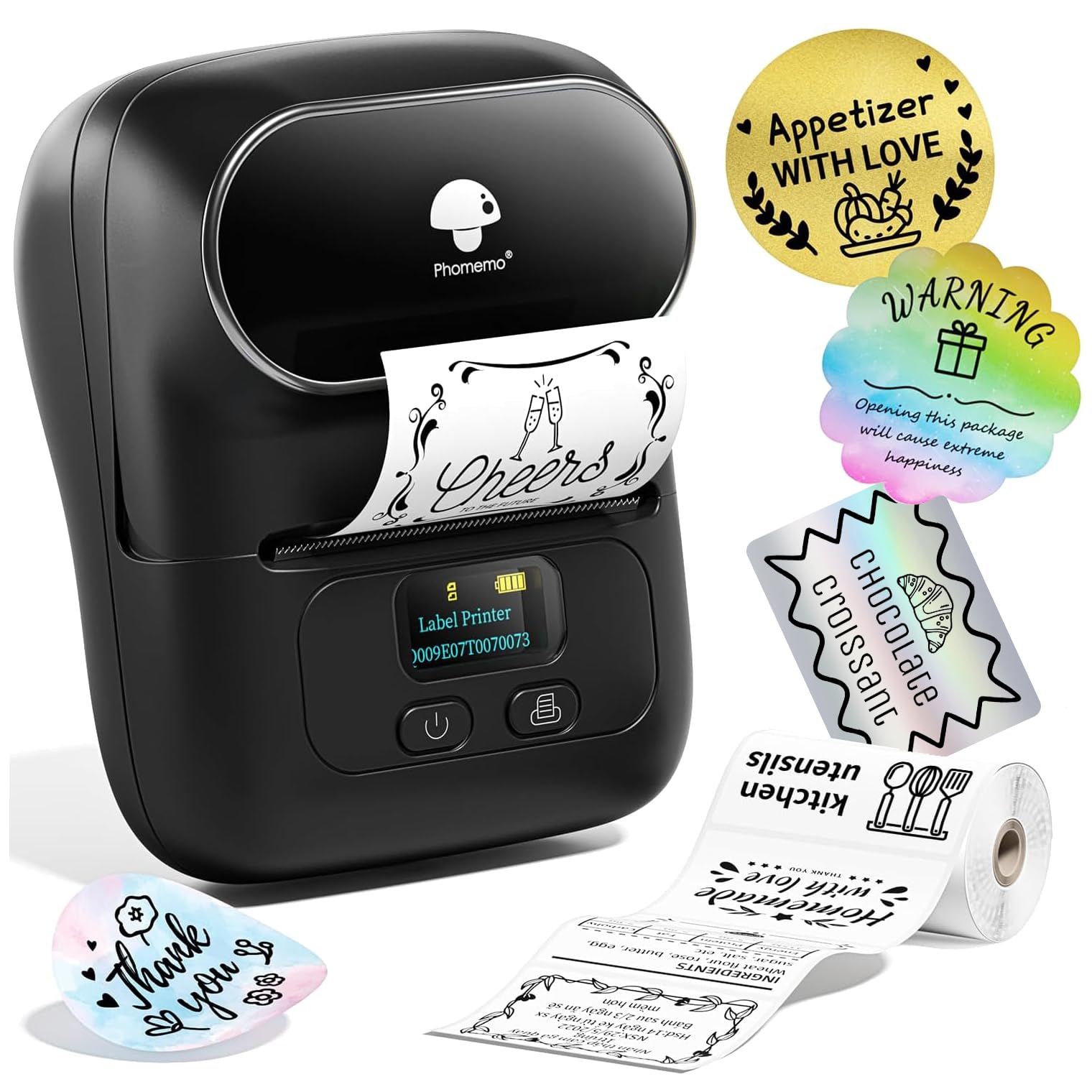
The Phomemo M110 Label Maker Machine review comes down to a useful mix of portable thermal printing, phone-based design tools, and support for labels up to 50 mm wide.
It suits small businesses and home users who want repeatable product, price, address, or organization labels without ink.
Phomemo M110 Review Summary
The quick verdict
2,000+ ratings
Read Amazon ReviewsPhomemo M110
A compact thermal label maker for sellers and organizers who want customizable labels from a phone, with optional computer printing by USB.
- Direct thermal printing avoids the need for ink or toner; the output is monochrome.
- Prints labels in widths from 20 to 50 mm, with barcode, address, ingredient, and price label uses described.
- Bluetooth connection to iPhone or Android devices through the Print Master app.
- The app includes more than 130 fonts and 300 templates; additional custom sticker templates are available through a subscription.

Pros
- Thermal printing removes ink and toner from the ongoing supply routine.
- The 20–50 mm width range works for many small product and organization labels.
Consider before buying
- Monochrome thermal output is a constraint if your labels need colored printed text or graphics.
- The included starter labels are one size, so buyers planning other formats should check compatible label stock before ordering.
Read the full review summary
The M110 is built around a straightforward workflow: create a label in the Print Master app, connect over Bluetooth, and print on thermal label stock.
Its 20–50 mm width range and templates for barcodes, ingredients, addresses, and pricing give it practical flexibility for small product labels and routine organization.
A starter supply of 100 labels, a claimed four-hour battery life, and batch-printing support make it a plausible fit for preparing labels away from a desk.
The listing also specifies USB connections for PC and Mac, which may help when a phone is not the preferred design device; check software and operating-system compatibility for your setup before buying.
The buying factors
Phomemo M110 Scorecard
Editorial scores reflect listed features and buyer fit; they are not laboratory measurements or customer ratings.
Label width flexibility
The 20–50 mm range covers a useful variety of compact product, address, and organization labels.
Mobile workflow
Bluetooth pairing through the Print Master app is designed to make phone-based label creation direct.
Design options
More than 130 fonts and 300 templates offer a broad starting point for customized labels.
Batch labeling
Batch printing and a claimed 1.2 inches per second target repeated labeling jobs.
Portability
Cordless operation and a stated four-hour battery life support use away from a fixed workstation.
Computer flexibility
USB support for PC and Mac is listed, but buyers should confirm the software workflow for their particular computer.
Key Features and Specifications of Phomemo M110
- Direct thermal printing avoids the need for ink or toner; the output is monochrome.
- Prints labels in widths from 20 to 50 mm, with barcode, address, ingredient, and price label uses described.
- Bluetooth connection to iPhone or Android devices through the Print Master app.
- The app includes more than 130 fonts and 300 templates; additional custom sticker templates are available through a subscription.
- Supports batch printing, with a stated print speed of 1.2 inches per second and four-hour battery life.
- Includes 100 starter labels in 40 × 30 mm size; USB connection for PC and Mac is listed.
Pros and Cons of Phomemo M110
Pros
- Thermal printing removes ink and toner from the ongoing supply routine.
- The 20–50 mm width range works for many small product and organization labels.
- Templates and fonts reduce the effort of creating consistent designs from scratch.
- Batch printing, Bluetooth, and battery operation suit mobile or event-preparation tasks.
Consider before buying
- Monochrome thermal output is a constraint if your labels need colored printed text or graphics.
- The included starter labels are one size, so buyers planning other formats should check compatible label stock before ordering.
- Extra custom sticker templates require a Print Master subscription, which may matter if the included selection does not cover your needs.
Who Should Buy Phomemo M110?
Good fit
Consider the M110 if you sell small products, prepare ingredient or price labels, or want to print repeatable labels for home or classroom organization.
The phone app, template library, and batch-printing support are suited to jobs where handwriting each label would be slow or inconsistent.
It is also a reasonable candidate for mobile work where a compact printer and battery operation are useful.
Before purchase, confirm that your intended label dimensions fall within the 20–50 mm width range and that the available thermal label stock matches your needs.
Who should skip it
Choose another type of printer if you need color output or labels wider than 50 mm.
For computer-led work, confirm that the M110's USB setup and the relevant software support your operating system before relying on it as your primary workflow.
How the Phomemo M110 Fits Small Labeling Jobs
A practical width for product labels
The M110's 20–50 mm width range covers many compact tags used for prices, ingredients, barcodes, and product identification.
Buyers should compare the label's width and length with their packaging or container before settling on a roll, since a design that fits a narrow tag may not suit a larger address or display label.
Phone-first design, with a computer option
Bluetooth printing through the Print Master app makes a phone the clearest described route for designing and sending labels.
The listed USB option for PC and Mac broadens the setup, although computer users should check the required app and driver details for their operating system before making that the central workflow.
Templates help with repeat work
The stated library of 300 templates and more than 130 fonts provides a head start for common label formats.
Combined with batch printing, it can make repeated runs more manageable; buyers with a highly specific layout should check whether the app can produce that design without relying on the additional subscription templates.
Thermal printing shapes the output and supplies
Ink-free thermal printing keeps the supply routine focused on compatible labels, and monochrome output is well suited to clear text and basic label information.
The included 100 labels provide a starting point, but regular users should choose refills that match the M110's supported width and the size their products or storage require.
Alternatives to Phomemo M110
Desktop Label Printers alternative

6,000+ ratings
Read Amazon ReviewsPhomemo M110 with Three Labels
Consider this package if trying three label sizes from the start is more useful than receiving a single starter size. The reviewed M110 remains a suitable fit if its one included size matches your first jobs.
- This M110 package includes three label sizes: 40 × 30 mm, 50 × 30 mm, and 50 × 80 mm; its description also specifies Bluetooth 4.0 and labels up to 50 mm wide.
- The reviewed M110 package includes 100 starter labels in one 40 × 30 mm size.
Desktop Label Printers alternative

700+ ratings
Read Amazon ReviewsPhomemo M220
Choose the M220 if you need its wider label range and computer connectivity, while keeping in mind its stated limit on 4 × 6 shipping labels.
The M110 is the more direct fit for compact labels within its narrower width range and phone-led use.
- The M220 supports label widths from 0.78 to 3.14 inches, Bluetooth for phones and tablets, and USB connections for Windows, macOS, and Chrome; its description explicitly excludes 4 × 6 shipping labels.
- The M110 supports labels from 20 to 50 mm wide and includes 100 labels in a 40 × 30 mm size.
Is Phomemo M110 Worth It?
The Phomemo M110 is worth considering for small businesses and organizers who need compact monochrome labels, flexible templates, and repeat printing from a phone.
Its battery-powered design and included starter labels make it ready for modest jobs without ink supplies.
Buy it if your label dimensions fit the 20–50 mm range and thermal monochrome output is right for your designs. Check computer compatibility and label-stock sizing ahead of time if those determine your workflow.
Your review at a glance
2,000+ ratings
Read Amazon ReviewsPhomemo M110
A compact thermal label maker for sellers and organizers who want customizable labels from a phone, with optional computer printing by USB.
- Direct thermal printing avoids the need for ink or toner; the output is monochrome.
- Prints labels in widths from 20 to 50 mm, with barcode, address, ingredient, and price label uses described.
- Bluetooth connection to iPhone or Android devices through the Print Master app.
- The app includes more than 130 fonts and 300 templates; additional custom sticker templates are available through a subscription.